
Turnitin Instructor Guide-TA Account Request
Turnitin operating model
Instrucor self-submission paper check
(Choose one of the following choices)
Similarity report (classic report)
- Accessing the Similarity Report
- Similaritiy Scour percentage rangers
- Using the Match Overview and Match Breakdown
- Viewing all sources
Managing exclusions and filters (classic report)
- Exclude quotes and bibliography
- Matches by word count or %
- Excluding sources via Match Overview
- Excluding sources via All Sources
- Restoring excluded sources
Similarity report (Enhanced report)
Managing filters and exclusions (Enhanced report)
FAQ
- Requesting the deletion of submissions
- Error message: "The password for this account has expired"
- Account Locked Due to Inactivity for More Than 6 Months
To add a Teaching Assistant (TA), the instructor must first contact the administrator to request an instructor account for the TA.
Only instructor accounts from the same institution can be added as TAs. Student accounts and external users cannot be assigned as TAs.
Note: If an instructor account has not yet been created for the TA by the administrator or sub-account administrator, an error message will appear (as shown below), and the TA cannot be added.
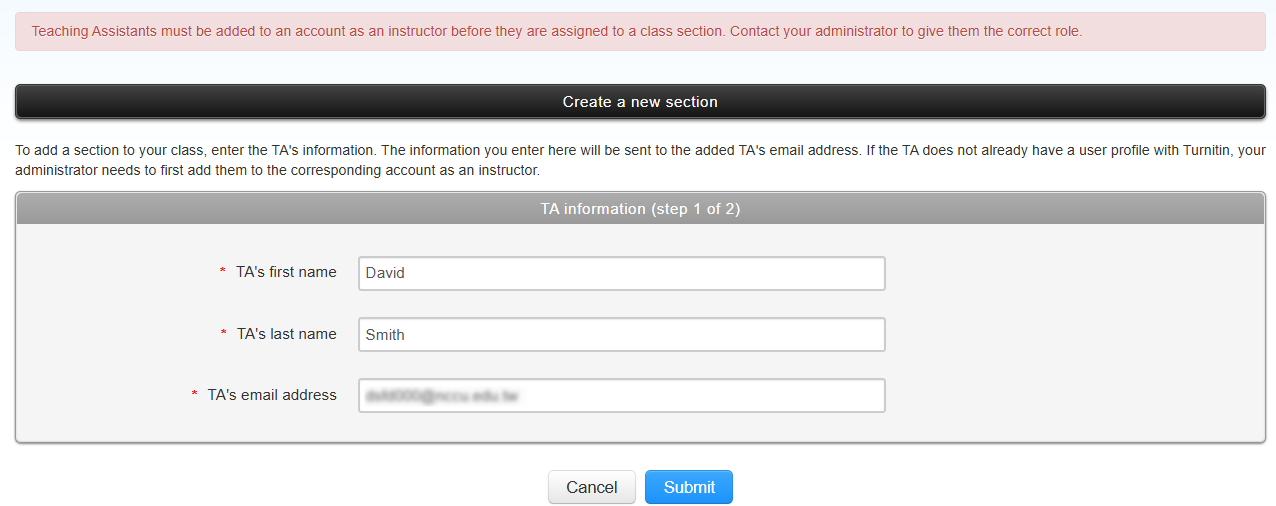
If you would like to add a teaching assistant (TA) to help manage your Turnitin class, please email the following information to libnews@nccu.edu.tw :
| Email subject: | Application for a Turnitin Instructor Account for a TA |
| TA name: | [Full name] |
| TA email: | [NCCU email address only] |
| Course management end date: |
[e.g., 31 January 2027] The TA’s Turnitin instructor account will be automatically deactivated after this date. |
Please Note: *TAs must activate their library privileges (i.e., be eligible to borrow library books) before applying for a Turnitin instructor account.*
2. Set Up TA Account
Click "Add Class"

Please configure the following settings in order:
Class Type: Select "Master"as the class type. (Default is "Standard". "Master" must be selected if you wish to add a TA)
Class Name: Enter a class name.
Subject Area: Select the relevant subject area(s).
Student Level: Select the appropriate student level(s).
Class End Date: Set the end day by semester or academic year .
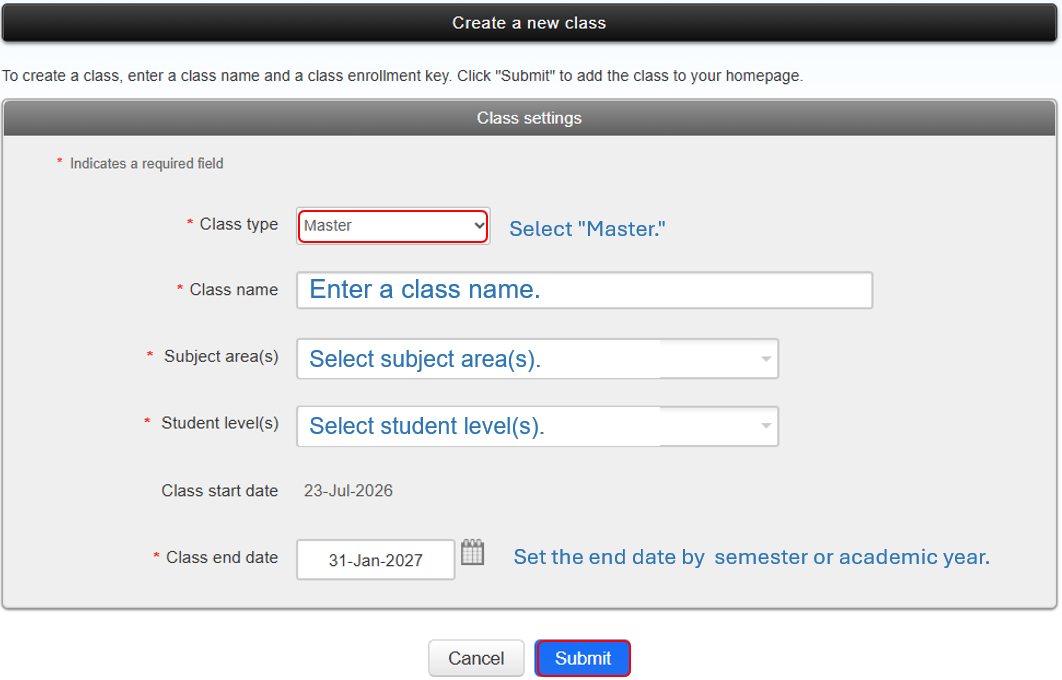
Click "Submit" to return to the Class Homepage.

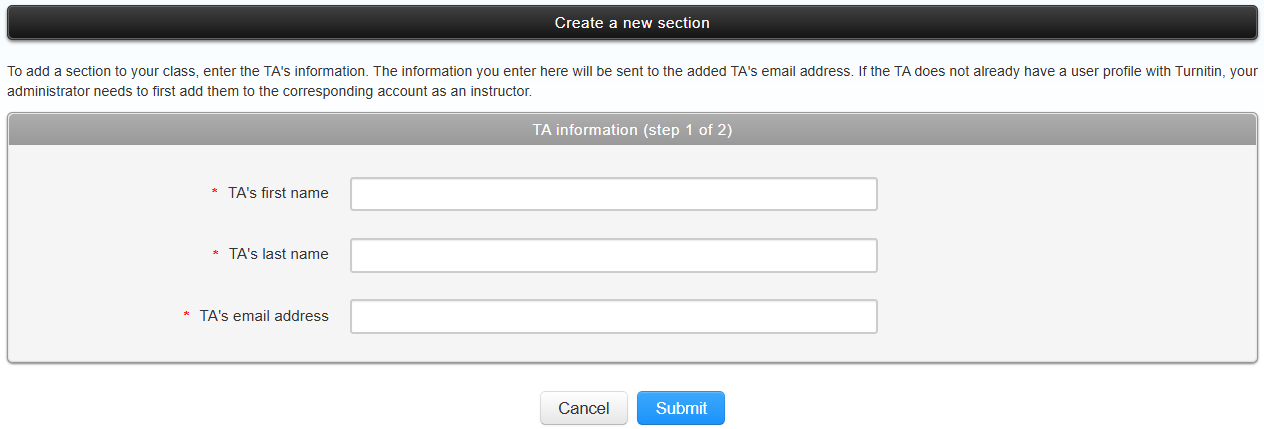
Click “+ Section” next to the master class to create a section for the teaching assistant. Enter the teaching assistant’s first name, last name, and email address, then click “Submit” to complete the setup.
Enter information for your section below including a section enrollment key and an optional section name/number.
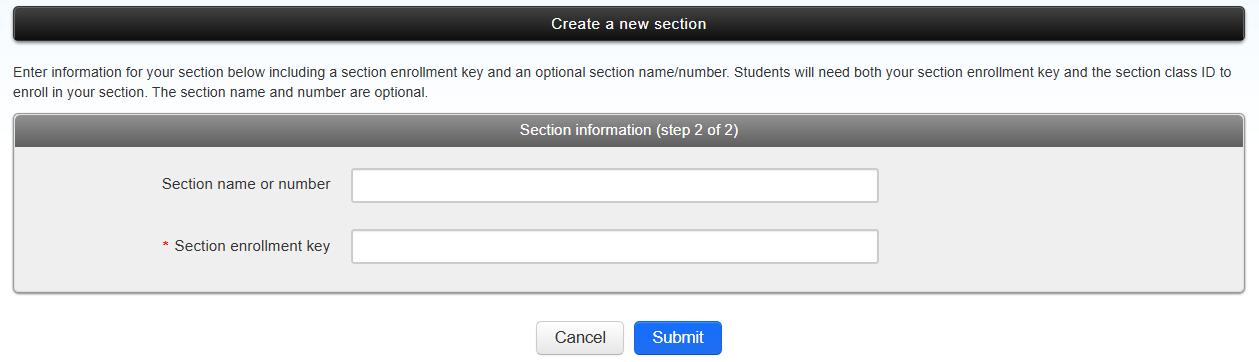
Click submit to add the class. Class information will be displayed in a pop-up window containing the ID and enrollment key for confirmation. You should not share your enrollment key publicly. With a Class ID and key anyone, at any institution, will be able to join your class.

Teaching Assistants can then add assignments and students for subsequent management.
3. TA Adding Assignments
Once the TA completes account activation, they can log in to Turnitin, click on the class name, and add an assignment.

For detailed instructions, please refer to the
Add Assignment Guide.